MacIP: TCP/IP Stack for Mac 128K and 512K
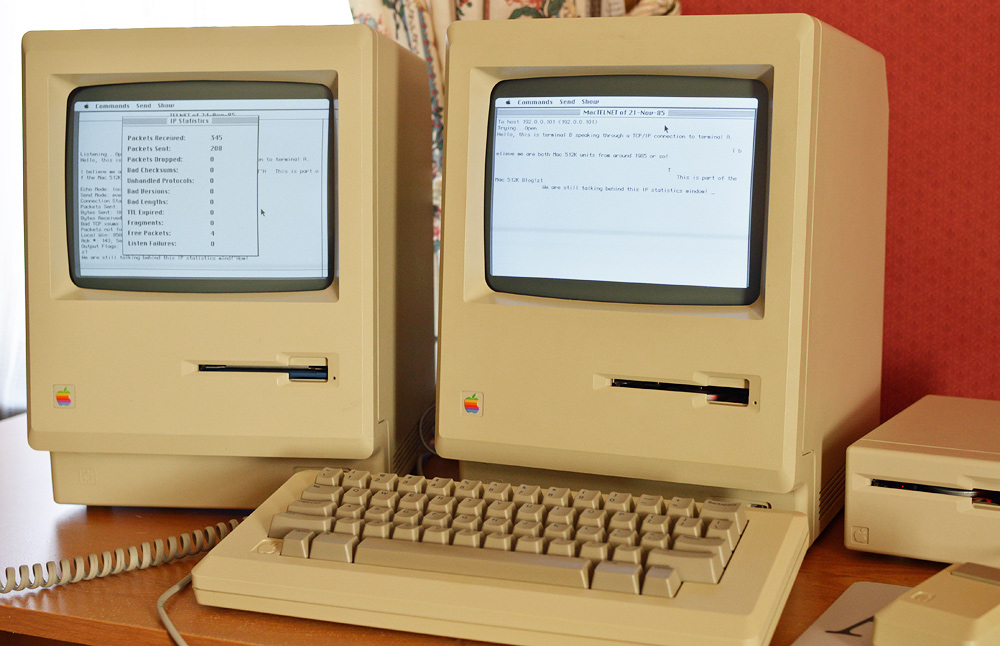
Would you believe that there was a TCP/IP stack for the Macintosh 128K in 1984? It's true!
In summer 1984, Mark Sherman at Dartmouth College began porting MIT's PCIP to Macintosh using Lisa Pascal. This was still a few months before the Mac 512K was released. But sadly it seems that everyone has forgotten about this project, which included functional Telnet and TFTP applications.
In today's Mac 512K Blog article, we are going to resurrect this long-lost TCP/IP stack, the first-ever written for Macintosh 128K and 512K.
Bridging the Gap From Unix to Mac
The Macintosh was popular in university environments in part due to Apple's marketing efforts. In spring 1984, thousands of Macintosh computers were in the hands of students at Drexel, Stanford, Carnegie-Mellon, University of Texas, and many other campuses.
Unix was the dominant operating system at most of these universities, therefore there was a strong motivation to connect the Macintosh to existing Unix machines and networks. TCP/IP, while not ubiquitous like it is today, was commonplace. After connecting a Macintosh via RS232 serial to a Unix machine, it next made sense to write a TCP/IP protocol stack for Macintosh.
As AppleTalk (then called AppleBus) was still under development and not fully documented, and all Macintosh software had to be developed on Lisa, the job of writing a TCP was indeed a large one. Furthermore, once TCP was running on the Macintosh, some kind of bridge or gateway was required to connect AppleTalk to Ethernet.
The first thought was to port a small C-based IP package, including common userland programs such as telnet and ftp. The networking code in BSD 4.2 would provide a good starting point, but the trouble was that the code was in C, and there was at the time no C compiler for Macintosh in spring 1984.
Mark Sherman at Dartmouth wasn't deterred at all by a lack of a C compiler. He used what was available-- Lisa Workshop Pascal-- and ported the C source from MIT PCIP to Lisa Pascal. This project was part of a larger plan, funded by a grant from Apple Computer, Inc., to connect Macintosh computers to TCP/IP networks. Both a software protocol package and a hardware router were required.
By the end of August 1984, Mark had three applications ported and running on the Mac: TFTP (trivial file transfer protocol), TIME (a remote time synchronization service), and CUSTOMIZE. This latter application was used to set local IP address, gateway, and other IP configuration information.
To support the asynchronous TCP/IP protocols, Mark wrote a multitasking library for Macintosh, probably one of the first ever written.
In December 1984, Tim Maroney at Carnegie-Mellon University took over the project and completed the TCP implementation and the corresponding Telnet application for it. The telnet emulates a DEC VT100 terminal. All of MacIP, including Telnet, will run on a Mac 128K.
The last release of MacIP was in November 1985. Tim went to work for Centram Systems West, where he developed TOPS for Macintosh and a commercial TCP/IP implementation compatible with Kinetics FastPath, an AppleTalk-Ethernet gateway.
Where to Get MacIP
The source code for MacIP was freely distributed on Usenet in the net.sources.mac newsgroup. The Binhex parts are available in Mac GUI's Usenet archive.
This page has a Zip file with the MacIP disks: MacIP Sources and Applications
Be sure to read over this PDF too: A Network Package for the Macintosh Using the DoD Internet Protocols by Mark Sherman
MacIP is compatible with the Mac 128K, 512K, 512Ke, and Plus. You will need to ensure that the AppleTalk resources are installed in the System file. MacIP might work on the Macintosh SE or Classic too, but I have not tested these newer models.
IP over AppleTalk
To demonstrate MacIP, we're going to connect two Macs. MacIP communicates over an AppleTalk network, meaning that if you have your Macs connected to an AppleTalk network, you are ready to run MacIP. If you only have two Macs to connect, you can use a serial printer cable.
MacIP will run on the Mac Plus too. To connect a Mac 128K or 512K to the Plus, use an Apple DE-9 to mini DIN-8 serial cable, as pictured below. Otherwise, if you are using PhoneNet cabling, you need no other hardware or cables.
By default, AppleTalk uses the Printer port, so be sure to connect your cables to this port.
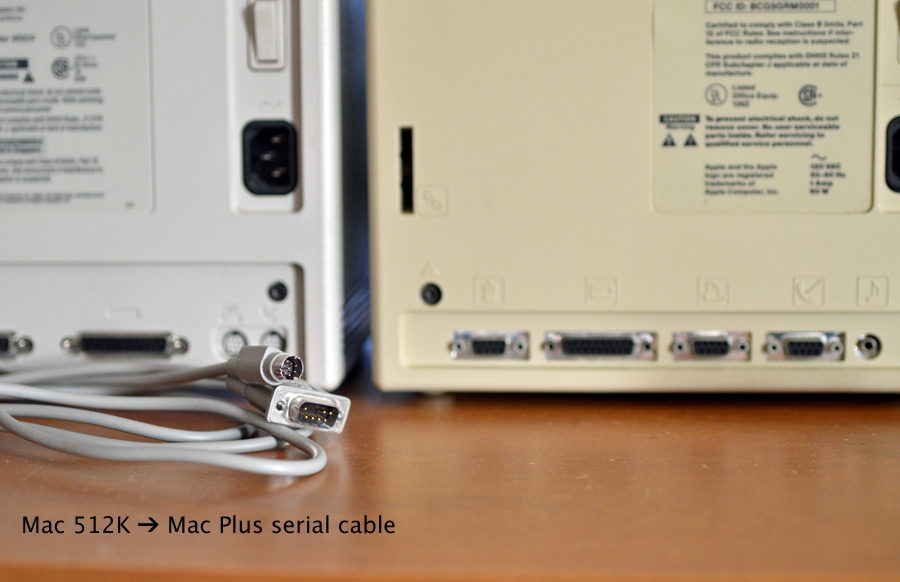
Connect a Mac Plus to a Mac 128K or 512K with this cable
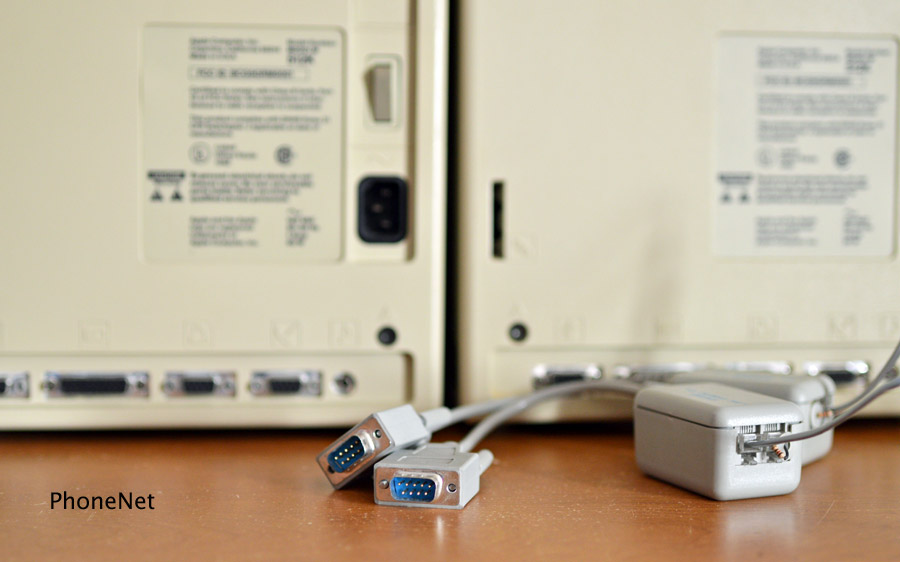
If you have PhoneNet connector boxes, use them to create your AppleTalk-MacIP network
Ethernet Gateways
It was intended that MacIP communicate through an AppleTalk to Ethernet gateway to access Unix machines. The most well-known router of the time was Stanford's Seagate, developed by Bill Croft at SUMEX. C-MU also had a router. The Seagate design was commercialized by Kinetics and became the Kinetics FastPath, later known as the Shiva FastPath.
MacIP supports the Seagate router. It may work with early versions of Kinetics' router, or any other router which is Seagate compatible.
It is not the point of this Mac 512K Blog to discus AppleTalk to Ethernet routers, but here are some good Usenet articles:
- Several AppleTalk to Ethernet routers, September 1985
- AppleTalk/Ethernet gateway summary, July 1985
- EFS network file server through SEAGATE, July 1985
Configuring MacIP
First you need to ensure that AppleTalk is connected and active. Use the Choose Printer or Chooser desk accessory (depending on your System version) to connect AppleTalk.
Even though the Mac 512Ke and Plus have AppleTalk in ROM, MacIP still expects to find necessary resources in the System file. You will need two DRVR resources: .MPP, ID 9; and .ATP, ID 10. You also need atpl ID 0.
The easiest way to get these AppleTalk resources is to copy the System file from the AppleShare Workstation disk.
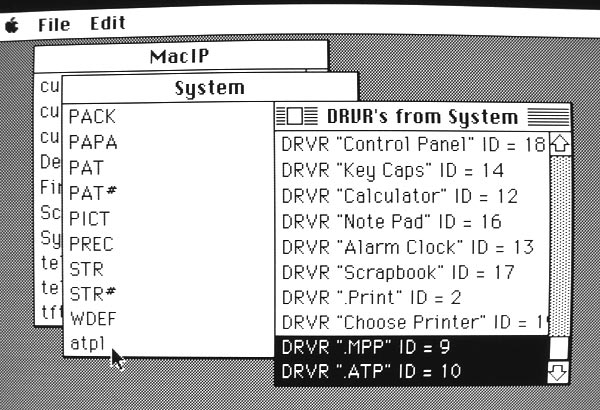
Using ResEdit to verify that the needed resources are installed
If you double-click telnet or tftp and see an error dialog saying "Can't open Mac Protocol Package," it means you are missing these three resources in your System file.
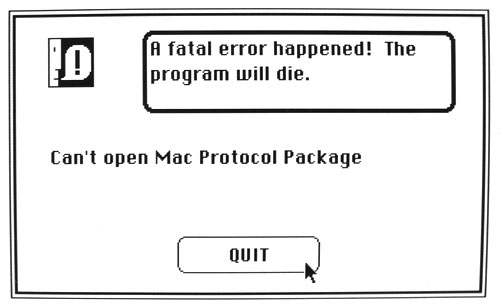
This error means you need to install the AppleTalk resources in your System file
Once you have AppleTalk installed and connected, open the Cust icon (a silly name; it should have been called Setup) to set your Mac's IP address. Make sure your disk is unlocked, as Cust will write a Customization Values file with the IP settings.
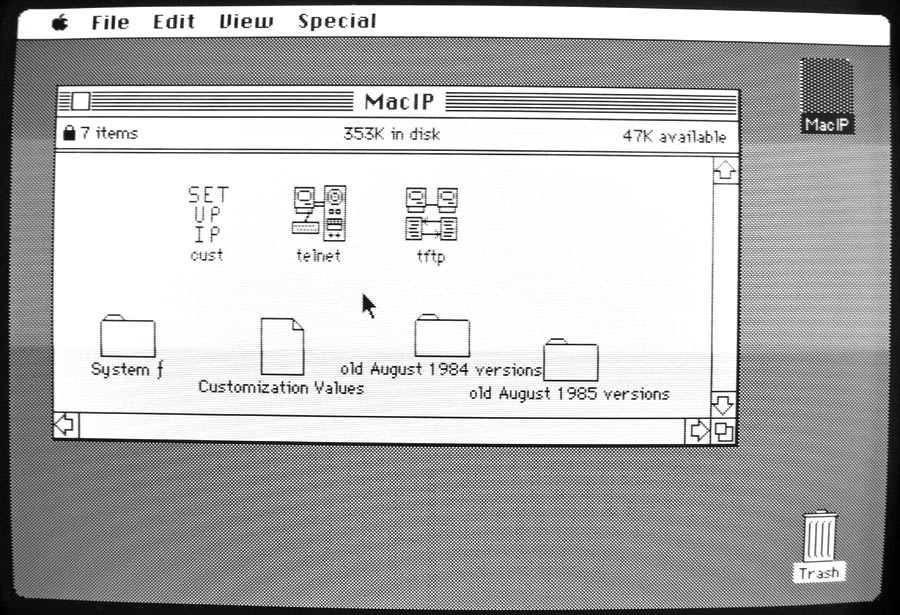
The screenshot below shows Cust. Early versions of MacIP from 1984 expressed IP addresses in hex instead of dotted-quad.
The only configuration field that matters here is the first one, Local IP Address. MacIP will pick an IP address based on your Mac's AppleTalk node ID. AppleTalk nodes range from 1 to 255, so this will become the last octet of your IP address.
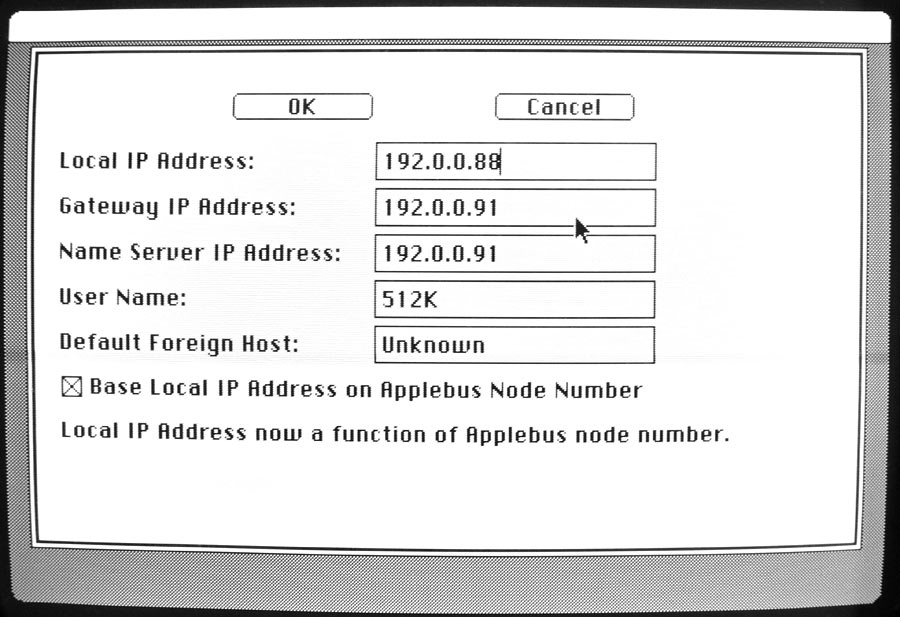
Our network does not have a gateway, nor is there a name server. Click the OK button twice to save your settings and return to the Finder.
Run Cust on your other Mac and give it a different local IP address.
Using Telnet
From the Finder, open Telnet on both Macs.
Choose My Internet Address from the Show menu to verify your Mac's IP address. Be sure that both Macs have a unique address.
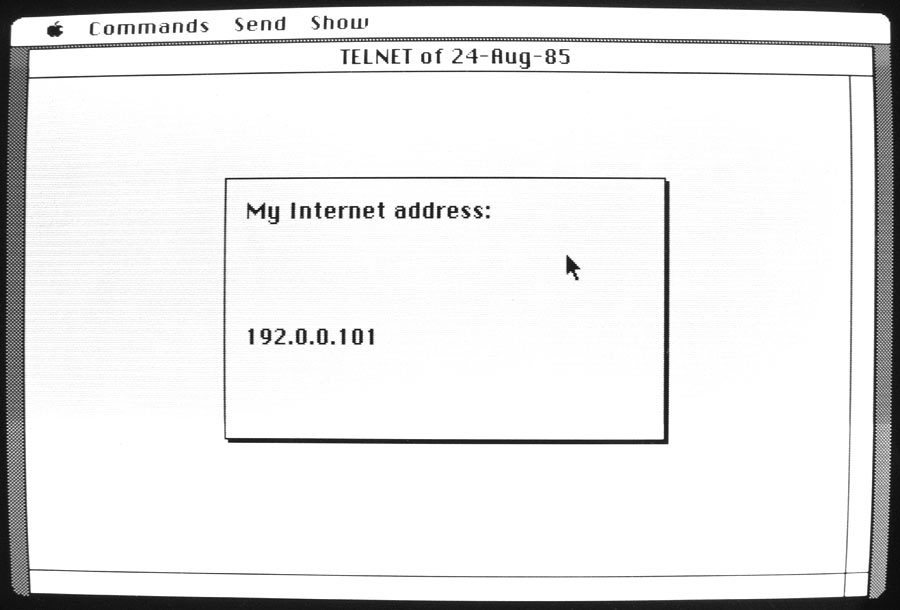
Verifying your Mac's IP address
On one Mac, choose Listen from the Commands menu to open a listening TCP socket.
On the other Mac, choose Open from the Commands menu. Enter the first Mac's IP address in the dialog box. The word Open should appear in the text window.
The TCP connection should now be established. Whatever you type on one Mac will appear instantly in the other Mac's text window. Telnet emulates a DEC VT100 terminal.
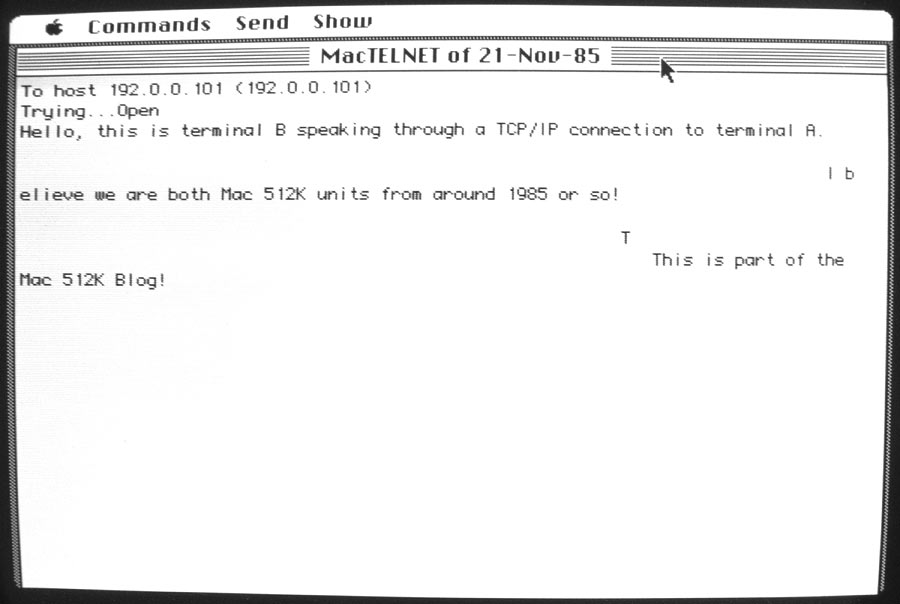
An established TCP connection
By default, MacIP will send a TCP segment for each keystroke. To instead buffer keypresses and send a line at a time, choose Send Immediately from the Commands menu to uncheck this option. Now MacIP will send a line after you press Return.
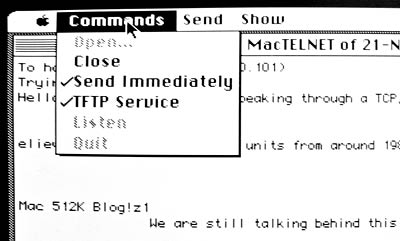
Send Immediately in the Commands menu
Your Mac keyboard probably doesn't have an Escape key. The tilde (~) key at top left will serve as Escape. Pressing Command-A is the same as Control-A. These features are more useful when connected to a Unix machine.
That's about it for Telnet. Unless you manage to get MacIP connected to a Unix box, you're limited to typing messages between two Macs. Telnet has a built-in TFTP client, or you can use the stand-alone tftp application to transfer files between Macs running MacIP. I'm not covering tftp in this Mac 512K Blog article.
Showing IP and TCP Statistics
MacIP, like any good TCP/IP stack, records statistics for number of IP datagrams sent and received, errors, and so on. Choose TCP Statistics from the Show menu to print the status of your TCP socket: window size, flags, connection state, and so on.
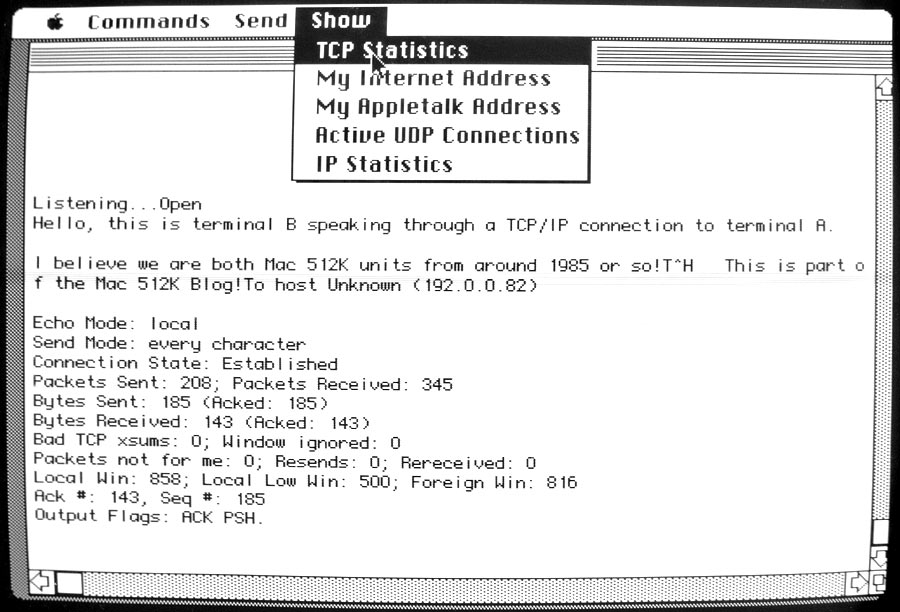
TCP Statistics
To see IP statistics, choose IP Statistics from the Show menu. The November 1985 version of Telnet has these two commands disabled to allow Telnet to run on a Mac 128K. Try running Telnet from August 1985, which has these statistics commands enabled.
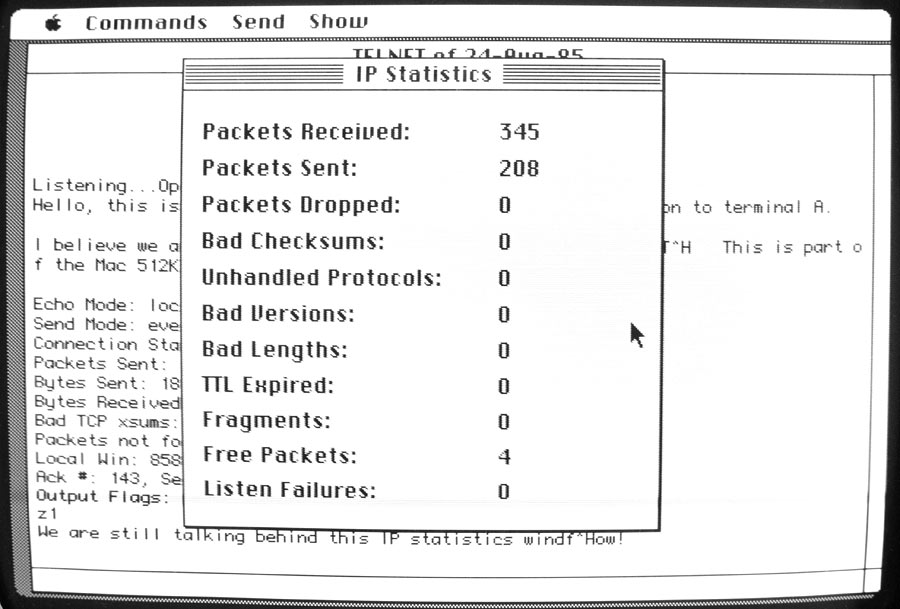
IP Statistics
Compatibility with Newer Mac TCP/IP Stacks
After creating a Telnet TCP connection between two Macs with MacIP, I next wanted to see if MacIP will connect to other TCP stacks for Mac. Otherwise, it's not very useful as it is. I connected a Mac 512K to a Mac SE/30 running System 7.5.3 for my experiments.
No success. It does not seem to work with OpenTransport TCP/IP configured for MacIP encapsulation (note that the name MacIP also refers to a method of encapsulating TCP/IP packets within AppleTalk). Nor does MacIP seem to work with MacTCP v2.0.6. It does not respond to pings from either TCP.
I don't think MacIP had a very long life, which explains why it remained forgotten for so long, despite being the first ever TCP/IP stack for Macintosh. Besides Tim Maroney's posts announcing its releases in August and November 1985, there is almost no other discussion on Usenet about it. By 1989 there were several competing TCP/IP stacks for Mac, including Stanford MacIP, TOPS TCP/IP, Kinetics HostAccess, InterCon's TCP/Connect, and Ungermann-Bass's Net One package. Apple released its own MacTCP package in spring 1989 for System 6 after announcing it in fall 1988 at Interop 88.
NCSA Telnet, from the University of Illinois at Urbana-Champaign, was a particularly popular, public domain TCP/IP stack. Early versions of NCSA Telnet, up to v2.0, ran on a Mac 512K or better. The manual for NCSA Telnet v2.2 says it requires a Mac Plus or better. MacIP from Stanford (a different package, despite the same name), was a collection of Unix programs that allowed Macintosh interoperability, either via a direct Ethernet connection from the Macintosh II, or via a Kinetics FastPath AppleTalk gateway.
Mark Sherman and Tim Maroney's MacIP was quickly forgotten.
Developing MacIP
The sources for MacIP are written in Lisa Workshop Pascal version 3.0. If you don't have access to a Lisa, the next logical choice would be to use Macintosh Pascal 2.0, TML Pascal, or Lightspeed Pascal. These Pascal development environments were purposely written to be compatible with Lisa Pascal.
MacIP is about 12,000 lines of source. A small percentage is written in 68000 assembly language: the DDP packet listener, and Pascal interface to the multitasking library. The code appears to be well-organized and fairly well commented. Having a copy of MIT PCIP to refer to would probably be helpful as well.
Perhaps the most useful task would be to write a SLIP or PPP interface to connect to a modern machine running TCP/IP. Being connected to a modern machine running a packet sniffer such as Wireshark would greatly aid development of the Macintosh UDP and TCP implementations.
How to connect a Mac 512K to a modern Ethernet network is one of the largest problems outstanding and once I have a practical solution, I too would like to develop a TCP for Mac 512K, perhaps using MacIP as a starting point. A software router running on a Mac with LocalTalk and Ethernet may be a good solution. The solution should be practical for the greatest number of people who still have these old Macs.
We may cover Ethernet gateways and other TCP/IP stacks in a later Mac 512K Blog. Until then, it's just another task on the to-do list! Join me in the next Mac 512K Blog, Exploring the Macintosh ROM, where we will disassemble and dissect the Mac's firmware.
| The Mac 512K Blog wrote: |
| This blog chronicles the Macintosh 512K and my projects with it. We will test software, fix hardware, program it, hack it, and generally take the 512K Macintosh to its limits. Do leave any feedback you may have by posting a comment to this article. |